Most companies already collect plenty of customer feedback. Support tickets, app store reviews, NPS comments, sales call notes, community threads and churn surveys pile up every week. The hard part is turning that pile into decisions someone will act on before the next renewal cycle.
That is the job of voice of customer software. But VoC tools vary widely. Some are survey tools with a dashboard attached. Others are tagging systems that need a full-time analyst to maintain. A smaller group reads feedback the way a good researcher would, connects it to revenue, and tells you what to do next.
If you are evaluating voice of customer software this year, these are the features worth putting at the top of your list.
1. Ingestion from every channel your customers use
Customers do not send feedback to one place. A single frustration might show up as a support ticket, a one-star review, a comment on a sales call and a line in a cancellation survey.
Good VoC software pulls from all of these without a custom integration project for each one. Look for native connectors to your helpdesk (Zendesk, Intercom, Freshdesk), app stores, review sites like G2, survey tools, call recording platforms, CRM notes and internal channels like Slack. Check two things in the demo: how quickly a new source goes live, and whether the tool recognises when the same customer raises the same issue across several channels, so one loud problem does not get counted five times.
If you want a feel for what a good read of one channel looks like before you talk to any vendor, run your own app store reviews through the free App Review Analyzer. It turns a hundred reviews into themes, sub-themes and quotes in a few minutes. For the full list of sources HyperOrbit reads today, see the 76 connectors.
If integration is where your last rollout stalled, we wrote separately about what easy integration really means in voice of customer software, and how to test it on your own stack before you sign.
2. Theme detection that adapts to your product
Early feedback tools relied on keyword rules and fixed tag lists. They broke the moment customers used different words than the ones you predicted, and someone had to keep editing the rules forever.
Modern voice of customer software uses language models to group feedback into themes automatically, then lets your team rename, merge or split those themes to match how you talk about your product. The taxonomy should grow as your product grows. When you ship a new feature, feedback about it should surface as its own theme without anyone building a new rule.
Ask the vendor to show you a theme it discovered that nobody had tagged in advance. That tells you more than any accuracy claim on a slide.
3. Sentiment at the level of specific features
An overall sentiment score tells you very little. A customer can love your reporting, hate your pricing page and feel neutral about onboarding, all in one review.
Aspect-level sentiment breaks each piece of feedback into the parts of your product it mentions and scores each part separately. That is what lets a product manager see that sentiment on "exports" dropped after last month's release while everything else held steady.
4. Revenue and account context
This is the feature that decides whether VoC insights reach the leadership agenda. A theme raised by a crowd of free-tier users and a theme raised by three enterprise accounts up for renewal next quarter are very different problems.
Look for voice of customer software that connects to your CRM and billing data, so every theme carries the ARR attached to it, the accounts affected and how close those accounts are to renewal. With that context, prioritisation stops being an argument about who shouted loudest and becomes a conversation about revenue at risk.
Mention counts tell you who talks. Revenue context tells you who pays. A VoC tool that only has the first will keep sending the loudest request to the top of the roadmap.
5. Competitive context alongside customer feedback
Customers rarely react to your product in isolation. A competitor drops its price, ships a feature you do not have or changes its packaging, and within weeks your support queue and sales calls start to reflect it.
Most VoC platforms treat customer feedback and competitive intelligence as separate worlds, owned by separate teams. The more useful setup puts them on the same timeline, so you can see a competitor move and the customer reaction that followed it. HyperOrbit's Cause and Effect view is built around this idea: competitor moves plotted above the timeline, customer reactions below it, and the lag between them measured in days, along with the ARR touched by each reaction.
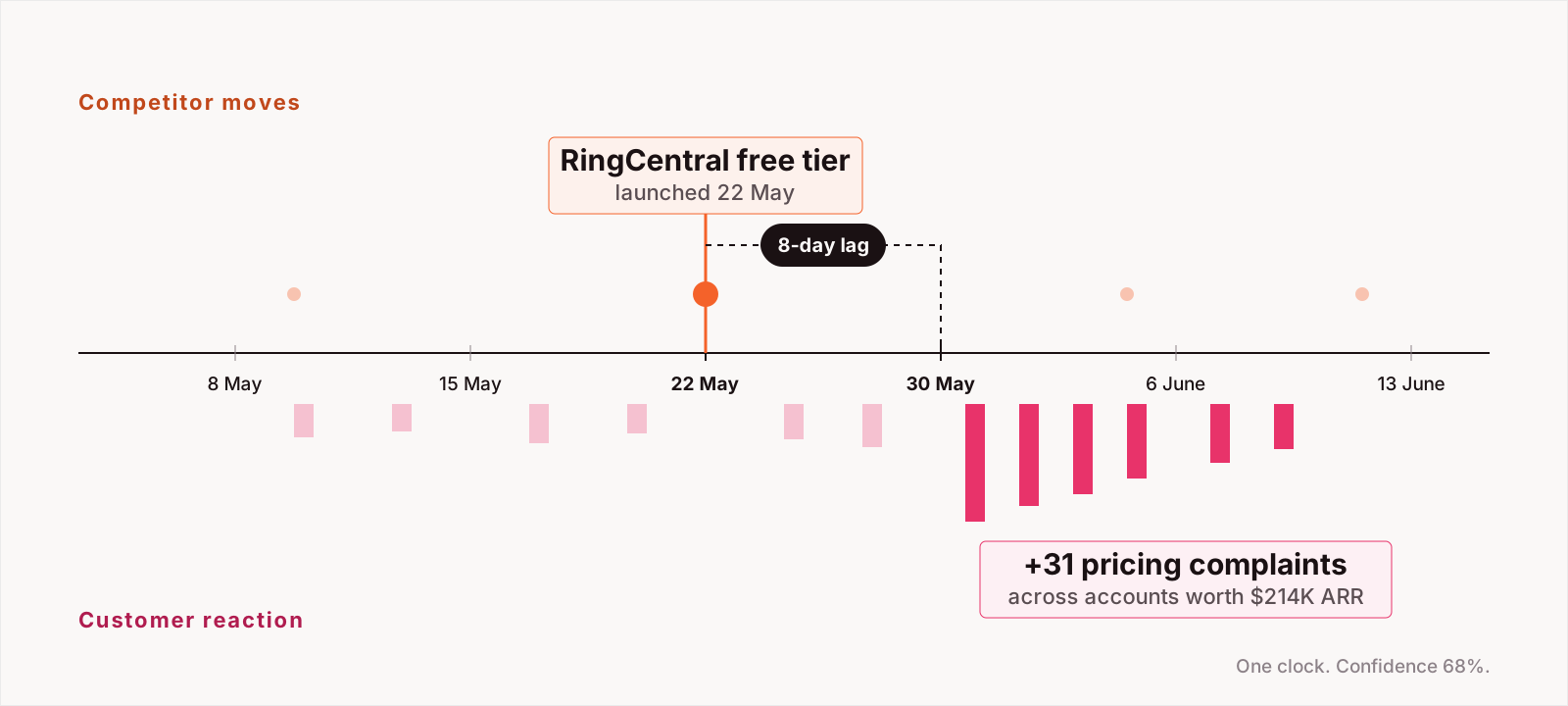
Ask the vendor how the tool explains a change in sentiment. If the answer never mentions what competitors did that month, you will be doing that analysis by hand.
6. Trend detection and early alerts
A monthly report tells you what already happened. By the time a spike in complaints shows up in a quarterly review, the affected customers may already be talking to competitors.
Strong VoC tools watch for unusual changes continuously: a theme growing faster than normal, sentiment dropping in a specific segment, a cluster of complaints from high-value accounts. They send those alerts to the people who can act, in the tools they already use, rather than waiting for someone to open a dashboard.
7. Answers you can question, with sources attached
Dashboards answer the questions someone thought to ask when they built them. Real questions come up mid-meeting: "What are enterprise customers in Europe saying about our API since the last release?"
Look for a natural-language interface where anyone on the team can ask a question in plain English and get a clear answer. Then check that every answer links back to the actual customer quotes behind it. Without sources, an AI-generated summary is hard to trust and impossible to defend in a roadmap review. In HyperOrbit, the Signal Desk plays this role across all of the product's agents, so a question can draw on customer feedback, competitor activity and account data together, and every answer cites the signals it used.
8. A path from insight to action
Insights that stay in the VoC tool do not change anything. The software should help you close the loop: turn a theme into a ticket in Jira or Linear, route an at-risk account to its customer success manager, and track whether the issue was resolved.
The best platforms go a step further and suggest the action along with the insight, then let a human approve it. This is where VoC software is heading. Agentic tools can draft the ticket, flag the account and prepare the summary for the weekly product review, while your team keeps control over what actually gets sent. Ask whether you can set how much the system does on its own, from suggestion-only to fully automated for low-risk tasks. HyperOrbit calls these Advisory, Supervised and Autopilot, set per agent.
9. Security and data governance
Customer feedback is full of personal data: names, emails, account details and sometimes payment information pasted into a support ticket. Any voice of customer software you shortlist should handle PII redaction automatically, support SSO and role-based access, and be clear about where your data is stored and whether it is used to train models.
This one rarely wins a demo, but it is often what holds up procurement. Ask for the security documentation early. HyperOrbit's commitments are on the trust and compliance page.
Questions to ask in every VoC demo
Feature lists look similar on vendor websites. These questions help separate them in a live demo:
- How long does it take to connect our three largest feedback sources, and who does the work?
- Can you show a theme the system found that no one defined in advance?
- How does feedback get linked to accounts and revenue in our CRM?
- When the AI answers a question, can I see every source quote behind it?
- What happens after an insight is found? Show me the path to a ticket or an alert.
- How does the tool account for competitor activity when explaining a change in sentiment?
- Where is our data stored, and is it used to train your models?
Choosing the right voice of customer software
The right tool depends on where your team loses the most time today. If feedback is scattered, start with ingestion. If you have data but no one trusts the analysis, focus on theme quality and sourced answers. If insights never reach the roadmap, prioritise revenue context and closing the loop.
HyperOrbit brings customer feedback, competitive intelligence and account context into one place, with AI agents that surface what changed, why it changed and what it means for revenue. If you are comparing VoC platforms, the ranked list of voice of customer software is a good next read, or book a demo to see it work on your own feedback sources.
Frequently asked questions
What is voice of customer software?
Software that collects customer feedback from channels such as support tickets, reviews, surveys and sales calls, groups it into themes, scores sentiment and links it to the accounts and revenue affected, so teams can decide what to fix or build next.
Which features matter most when choosing a VoC tool?
Multi-channel ingestion, theme detection that adapts to your product, feature-level sentiment, revenue and account context, competitive context on the same timeline, continuous alerts, answers with sources attached, a path from insight to action, and security and data governance.
How is VoC software different from a survey tool?
A survey tool asks customers questions at a moment you choose. VoC software reads what customers already say everywhere, continuously, and ties each theme to the accounts and revenue behind it.
What should I ask in a VoC software demo?
How long a new source takes to connect and who does the work; whether the tool can show a theme nobody tagged in advance; how feedback links to CRM accounts and revenue; whether every AI answer shows its source quotes; what happens after an insight is found; how competitor activity is used to explain sentiment changes; and where your data is stored and whether it trains models.