Plenty of voice of customer projects never fail outright. They just stall. The contract is signed, the kickoff goes well, and then the team spends two months waiting on API keys, field mappings and a data engineer who has three other priorities. By the time feedback starts flowing, the sponsor has moved on and the tool becomes another login nobody uses.
Integration is usually where this happens. A VoC platform can only analyse the feedback it can reach, and it can only drive action if it connects to the systems where work gets done. So when you evaluate voice of customer software, how easily it plugs into your stack deserves as much attention as the analysis itself.
This piece is about the plumbing. For the analysis side, start with the features to look for in voice of customer software.
What "easy integration" should actually mean
Every vendor says its integrations are easy. In practice, easy comes down to a few things you can check.
Time to first insight. The honest measure is how long it takes to go from signing up to seeing real themes from your own feedback. Ask for that number, and ask what the customer has to do during that time.
No-code setup for common sources. Connecting your helpdesk or app store reviews should take a few clicks and an OAuth login, done by a product or CX person. If every source needs an engineer, the tool will not grow past its first two connections.
Historical backfill. A new connection should pull in months of past feedback, not only what arrives from today onward. Without history, you cannot spot trends or compare before and after a release.
Ongoing sync without babysitting. Integrations should keep running when a source adds a field or changes its format. Ask what happens when a connection breaks and who finds out first.
The four kinds of integrations that matter
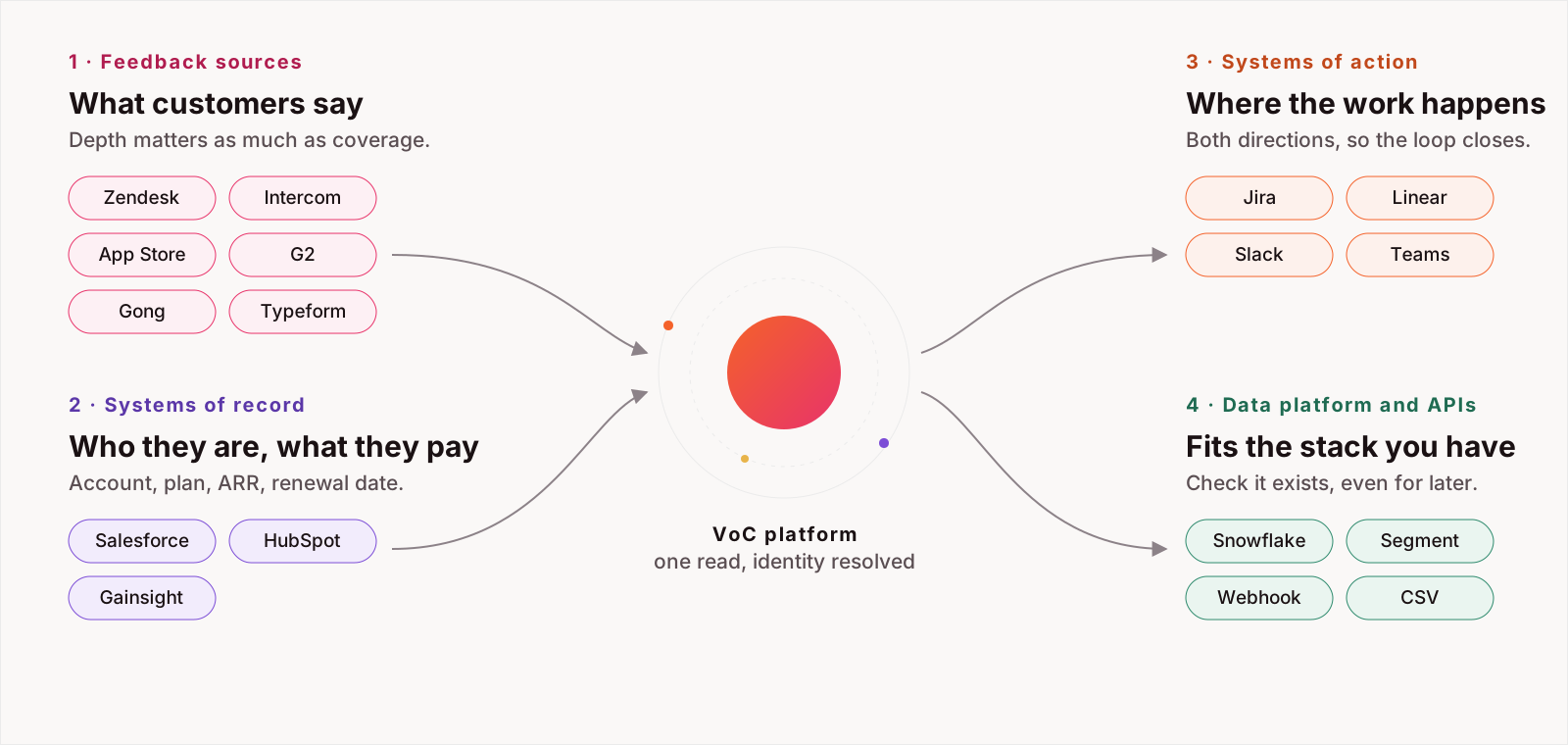
It helps to think of VoC integrations in four groups, because each one does a different job.
Feedback sources
These are the places customers talk to you or about you: support tools such as Zendesk, Intercom and Freshdesk; app store and review site listings; survey and NPS tools; call recording and transcription platforms; community forums; and internal channels where your team shares what customers said. Coverage matters here, but so does depth. A connector that pulls only ticket subject lines misses most of the signal.
Systems of record
Your CRM and billing system tell the VoC tool who each customer is, what they pay and when they renew. This is what lets the software rank a theme by revenue at risk rather than by volume. Look for a CRM connection that syncs account ownership, plan, ARR and renewal dates, and that updates when those fields change.
Systems of action
Insights need somewhere to go. That means your issue tracker (Jira, Linear), your team chat (Slack, Microsoft Teams), and your customer success tools. The best integrations here work in both directions: a theme becomes a ticket, and when the ticket is closed, the VoC tool knows the issue has been addressed and can watch whether complaints drop.
Data platform and APIs
Larger teams often want feedback insights in their data warehouse next to product usage and revenue data, or want to push their own sources in through an API or webhook. Even if you do not need this on day one, check that it exists. It is the difference between a tool you outgrow and one that fits into your data setup later.
Matching the same customer across every source
Connecting sources is only half the work. The other half is recognising that the person who filed a ticket, left a review and spoke on a renewal call belongs to the same account.
This is called identity resolution, and weak VoC tools skip it. Without it, one frustrated enterprise customer looks like three unrelated pieces of feedback, and you cannot attach revenue to anything. Ask the vendor how it matches feedback to accounts: by email domain, CRM ID, helpdesk organisation or a mix. Then ask what happens to feedback it cannot match.
Security during setup
Easy integration should not mean broad access. When you connect a source, check what permissions the VoC tool asks for. Read-only scopes are enough for most feedback sources, and write access should be limited to the systems where you want the tool to create tickets or send alerts.
It is also worth confirming that personal data is redacted as it comes in, before it is stored or analysed, and that you can disconnect a source and remove its data cleanly. Your security team will ask these questions anyway, and answering them early keeps procurement moving. HyperOrbit's answers are on the trust and compliance page.
How to test integration before you buy
A demo on the vendor's sample data tells you little about integration. Run a short trial on your own stack instead:
- Connect your two or three largest feedback sources yourself, without vendor help, and time it.
- Backfill at least six months of history and check that the volume matches what you see in the source tool.
- Connect your CRM and look up one account you know well. Is all of its feedback in one place?
- Send one insight to Jira, Linear or Slack and see how much editing it needs before it is usable.
- Ask who gets notified if a connection fails, and how quickly.
If a vendor resists a trial on real data, that tells you something about how the rollout will go.
Connect your largest source yourself, on a trial, and time it. The number you get is the rollout you will have.
Integration that gives you more than feedback
Once the basics are in place, a well-integrated VoC tool can connect signals that usually live in different teams. Customer feedback, competitor activity and account data sit side by side, so a shift in sentiment can be traced to a competitor's launch or a pricing change, and measured against the revenue it touches.
HyperOrbit is built around that connected view. It has 76 connectors across calls, chat, contact centre, CRM, support, reviews, social, surveys, product analytics, project tools and data pipes, including Snowflake, Databricks, Segment, a webhook and CSV upload. Each connects once over OAuth, usually in five to ten minutes, and the first pass lands the same day. You control which sources, fields and time periods each agent may read. Sources the list does not cover come in through the webhook or CSV today, and Enterprise customers can have a dedicated connector built in two to three weeks.
On the way out, actions land where your team works: Enterprise includes up to five outbound integrations such as Slack, Jira, HubSpot, Intercom and Zendesk. You can ask questions across all of it from the Signal Desk, with every answer citing the signals behind it. See the full connector list or book a demo to try it on your own data.
Frequently asked questions
What does easy integration mean for voice of customer software?
A short time to first insight on your own feedback, no-code setup over OAuth for common sources, historical backfill of months of past feedback, and syncs that keep running when a source changes, without an engineer in the loop.
Which integrations does a VoC platform need?
Four kinds: feedback sources such as helpdesks, reviews, surveys and call recordings; systems of record such as the CRM and billing; systems of action such as Jira, Linear, Slack and Microsoft Teams; and a data platform path through a warehouse, API or webhook.
What is identity resolution in VoC software?
Matching feedback from different channels to the same customer account, by email domain, CRM ID, helpdesk organisation or a mix, so one account's ticket, review and call are read together and revenue can be attached to a theme.
How do I test VoC integrations before buying?
Run a short trial on your own stack: connect your two or three largest sources yourself and time it, backfill six months, connect the CRM and look up one account you know, send one insight to your issue tracker or chat, and ask who is notified when a connection fails.