Internal Slack channels are among the highest-signal sources of customer feedback most B2B teams have. CSMs relay what they hear on calls. Sales flags churn risks and competitor mentions. Support surfaces recurring bugs and feature requests. Product managers drop notes from customer conversations.
The problem is that almost none of it gets mined systematically.
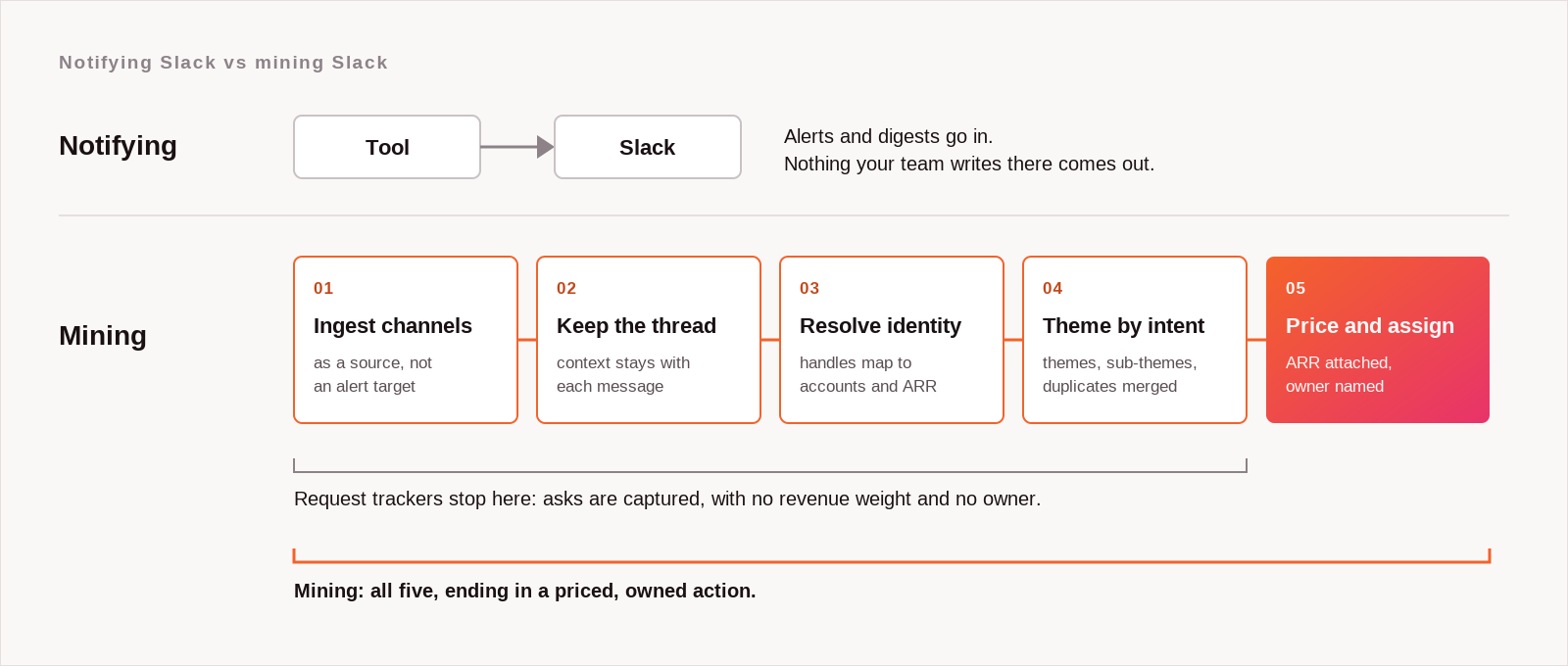
Most "Slack integrations" only push notifications or alerts into Slack. They do not ingest the content of internal channels, keep the thread context, resolve identity to accounts and ARR, cluster the feedback into themes, and hand the result to someone as a priced, owned action. The difference between notifying Slack and mining Slack is the difference between noise and decisions.
This guide evaluates six tools on the criteria that matter for turning internal Slack feedback into something useful at scale.
HyperOrbit wrote this list and is on it. Notes on the other tools come from each vendor's public pages, checked on 24 November 2026.
What mining Slack actually requires
We evaluated the tools against five practical criteria:
- Native ingestion of internal channels. The tool pulls conversations, including Slack Connect channels, as a first-class feedback source, not only as a place to send alerts.
- Thread and context preservation. The full conversational context is kept, so themes are accurate.
- Identity resolution to accounts and revenue. Slack handles and mentions map to customer records, ARR and account owners.
- Automatic theming by intent. Feedback is clustered into themes and sub-themes, not only explicit feature requests, and duplicates are merged.
- Revenue-weighted actions with owners. Each insight carries the ARR it touches and arrives as an owned next step, not only as a dashboard or a digest.
Tools that only notify Slack fail the first test. Tools that extract requests but never weight them by revenue or assign an owner stop short of a decision.
The six tools
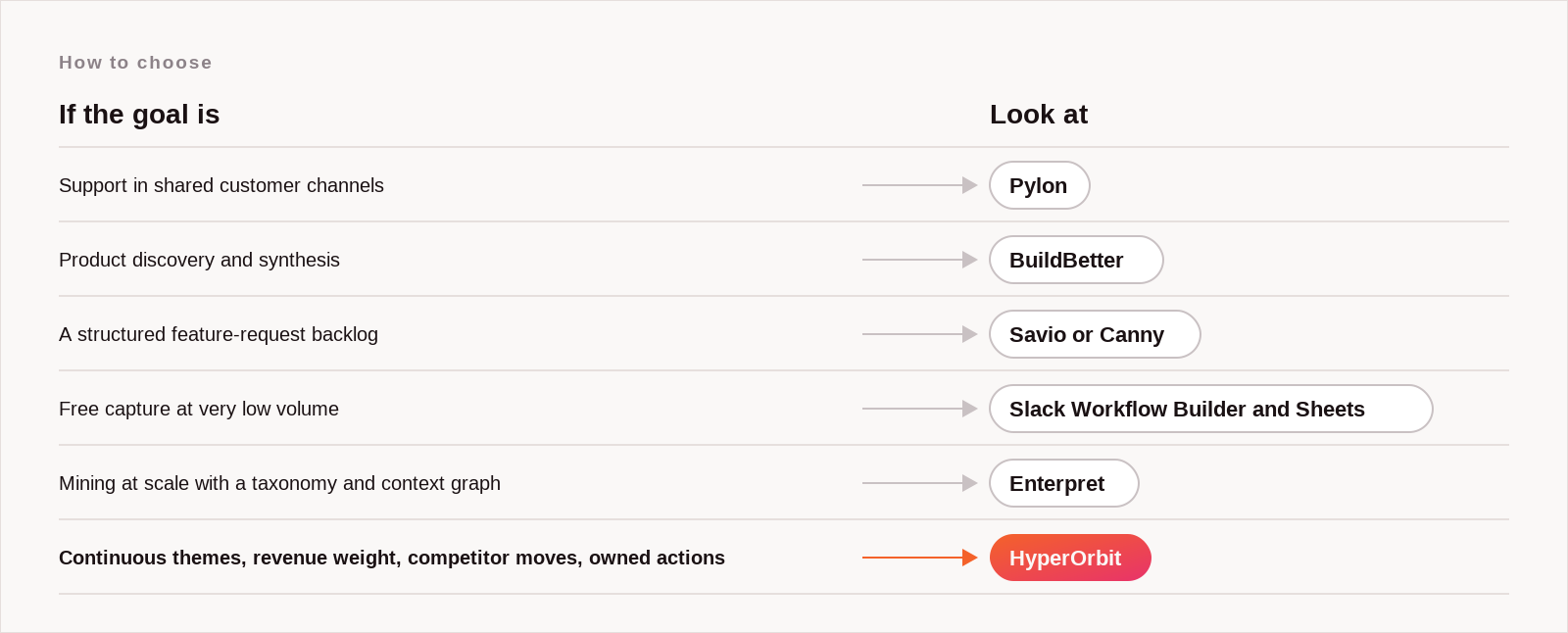
Each suits a different goal. The map below is the short version; the notes after it say why.
1. HyperOrbit (Chorus, Recon and Atlas)
Best for product, CX and revenue teams that want Slack feedback turned into continuous, revenue-weighted themes and owned actions.
HyperOrbit reads internal Slack channels, and the shared channels you connect, as one of 76 connectors the agents read continuously. Chorus, the voice of customer agent, clusters conversations by intent into ranked themes and sub-themes, attaches the accounts and ARR behind each theme, and shows the evidence with links to the source. Because the same signal layer feeds Recon (competitive intelligence) and Atlas (account intelligence, in beta), a pricing complaint in Slack can be linked to a competitor move and to the accounts and renewal windows it touches.
Actions land in the Signal Desk with an owner, a confidence score and the revenue at stake. On Enterprise, the read is delivered back into Slack. Starter is free: Chorus on one feedback source, with 50 signals and 10 insights a month. Enterprise is priced to the sources you connect, with unlimited sources.
HyperOrbit is strongest when the goal is not only analysing Slack feedback but turning it into decisions that protect or grow ARR, alongside every other feedback source.
2. Enterpret
Best for teams that want Slack treated as a first-class feedback source joined to an adaptive taxonomy and a customer context graph.
Enterpret connects selected Slack channels as a feedback source and categorises what it finds with its adaptive taxonomy, down to themes and sub-themes. Its customer context graph unifies users and accounts across sources, so feedback can be prioritised by revenue impact rather than by volume. Briefs and alerts go back into Slack.
It is particularly strong for mining at scale and for analysing Slack notes alongside tickets, reviews and calls. Where HyperOrbit differs is in pairing each theme with competitor moves and handing an owner the action. Our full comparison with Enterpret goes deeper.
3. Pylon
Best for B2B support teams that live in shared Slack channels.
Pylon is a B2B support platform that tracks customer issues from shared Slack channels, including Slack Connect, alongside email and chat. It also builds a current picture of each account, with health and churn-risk signals.
It is strong when the main workflow is resolving or prioritising what arrives in channels shared with customers. It is less oriented toward theming unstructured feedback across internal channels, or synthesising it for the product roadmap.
4. BuildBetter
Best for product teams synthesising feedback from Slack and calls into organised discovery signal.
BuildBetter connects Slack to capture feedback from channels, with channel monitoring and thread analysis, and reads calls, tickets and documents alongside it. It works well for teams that want to collapse async discussion into clearer signal for product discovery.
Calls remain its centre of gravity. Our comparison with BuildBetter covers where the two differ.
5. Savio or Canny
Best for teams that want to centralise and prioritise the explicit feature requests that surface in Slack.
Savio logs feature requests from a feedback channel or any public Slack channel, marks messages that are already logged so nothing is counted twice, and lets the list be sorted by number of requesters and by ARR from the CRM. Canny collects requests on boards where users vote, with a roadmap and changelog attached, and posts updates to Slack channels.
Both are request-centric and work well when the main need is a structured backlog of asks. They are less suited to mining unstructured sentiment, themes or competitor mentions that never take the form of a clean feature request. See HyperOrbit vs Canny for the longer version.
6. Slack Workflow Builder and Sheets
Best for small teams with low volume who want a free, lightweight way to capture feedback.
An emoji-triggered workflow can route messages to a Google Sheet. It is free and quick to set up, but it produces a flat list with no automatic deduplication, theming, identity resolution or analysis.
Anything untagged, or said in a DM, is missed, and all the synthesis stays manual. It suits only a volume low enough that a person can still read everything.
Why internal Slack feedback is usually wasted
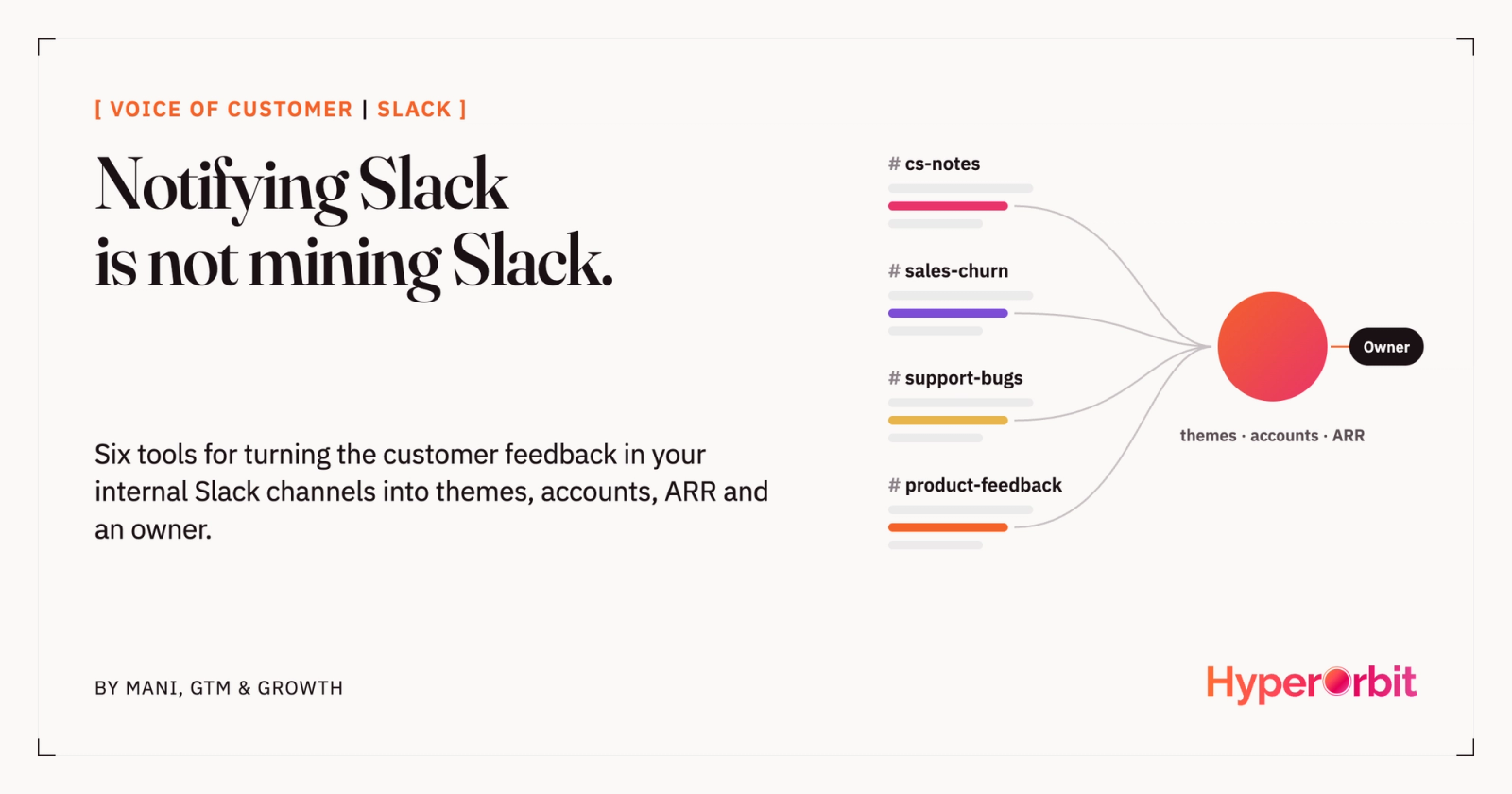
The feedback is high-signal because it is unsolicited and in context. It is also conversational, high-volume and fragmented across channels: #cs-notes, #sales-churn, #support-bugs, #product-feedback and the channels shared with customers.
Without continuous ingestion, thread preservation, theming by intent and identity resolution to ARR, the signal disappears into chat history.
Dedicated "feedback" channels degrade quickly, because they rely on manual effort and still miss most of the real conversation.
How to choose
- Support teams living in shared channels: Pylon.
- Product discovery and synthesis: BuildBetter.
- A structured feature-request backlog: Savio or Canny.
- Very low volume, free capture: Slack Workflow Builder and Sheets.
- Mining at scale with a taxonomy and context graph: Enterpret.
- Continuous theming, revenue weighting, competitor moves and owned actions: HyperOrbit.
The right tool depends on whether the goal is capturing requests, analysing feedback at scale, or turning Slack, and every other source, into decisions that have an owner and a revenue figure attached.
What your Slack feedback is worth
Internal Slack channels already contain the feedback that should shape roadmaps, retention plays and competitive responses. The tools above differ mainly in whether they leave that feedback as chat history or turn it into continuous, revenue-weighted, owned decisions.
To see what yours is worth, connect one source and let Chorus show you the themes, the accounts and the ARR behind them. Start free on HyperOrbit.
Sources, read on 24 November 2026: enterpret.com/integrations/slack-channels, enterpret.com/integrations/slack-inbound and enterpret.com/platform/customer-context-graph; usepylon.com/integrations/slack and usepylon.com/account-intelligence; buildbetter.ai/integrations/slack; savio.io/integrations/slack; canny.io/integrations/slack. Tell us if something is out of date and we will correct it.
Frequently asked questions
What is the difference between notifying Slack and mining Slack?
Notifying pushes alerts or digests into Slack. Mining ingests the conversations themselves, keeps their context, themes them, resolves who said what to an account and, in the stronger tools, weights the result by revenue and hands it to an owner as an action.
Why does so much customer feedback in Slack get lost?
Volume, the conversational format, fragmentation across channels and the lack of automatic theming and account resolution. Manual tagging and dedicated feedback channels do not scale, and they miss most of the real conversation.
How does HyperOrbit handle Slack specifically?
Slack is one of the 76 connectors the agents read continuously. Chorus clusters the feedback by intent and attaches the accounts and ARR behind each theme. Actions land in the Signal Desk, and on Enterprise the read is delivered back into Slack. The same layer links Slack signals to competitor moves through Recon and to account risk through Atlas, which is in beta.
Do these tools work with Slack Connect channels shared with customers?
Capabilities vary, so check each vendor. Pylon documents tracking public, private and Slack Connect channels. HyperOrbit reads internal channels and the shared channels you connect. Tools that only notify Slack do not read channel content at all.