
12 Minutes

AI prompts stopped being a party trick for product managers in 2025. By 2026 they’re just part of the job: the fast way to synthesize interview notes, pressure-test a roadmap, or turn a messy status update into something a VP will actually read.
But here’s the uncomfortable truth most prompt lists skip: a prompt is only as good as what you feed it. The fanciest prompt, given to an AI when I want to know nothing about the context, produces something that sounds confident but falls apart as soon as someone asks a follow-up question. That’s no question the model is failing. That’s you handing it nothing to work with.
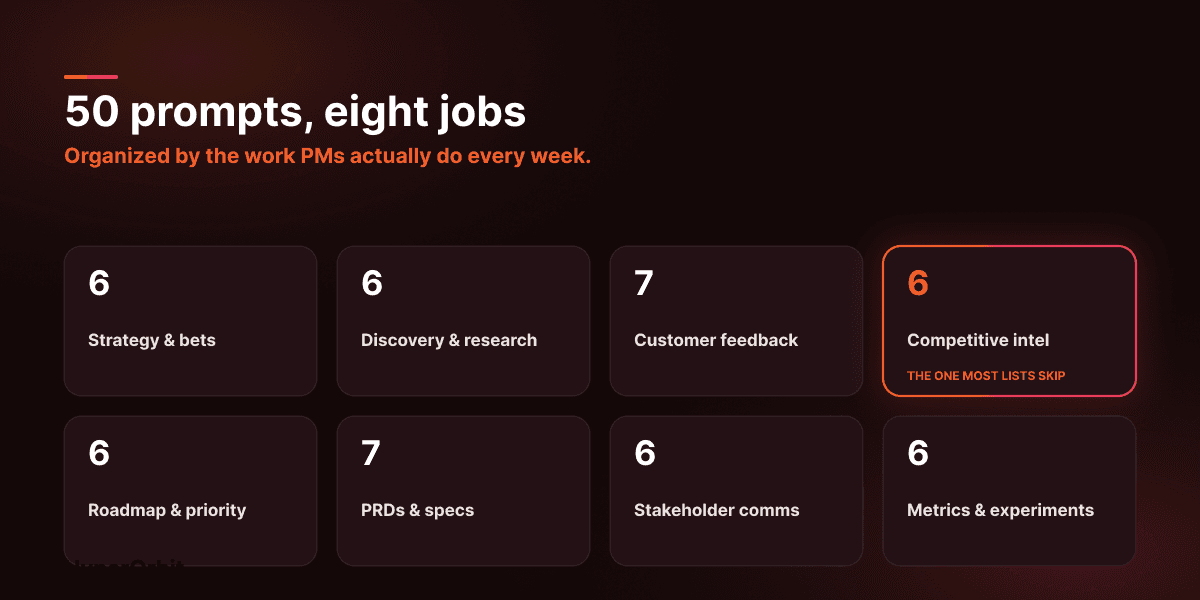
So this is two things at once. It’s a working library of 50 prompts you can copy, adapt, and reuse every week, organized by the actual jobs PMs do. It’s also a reminder that the prompts that earn their keep are grounded in real customer and competitive signals, not vibes and half-remembered calls. Steal from it. Let’s go.
First, the thing that makes or breaks every prompt
Most bad AI output comes from vague input. Give a model no context, constraints, or format, and it will give you a confident paragraph of nothing.
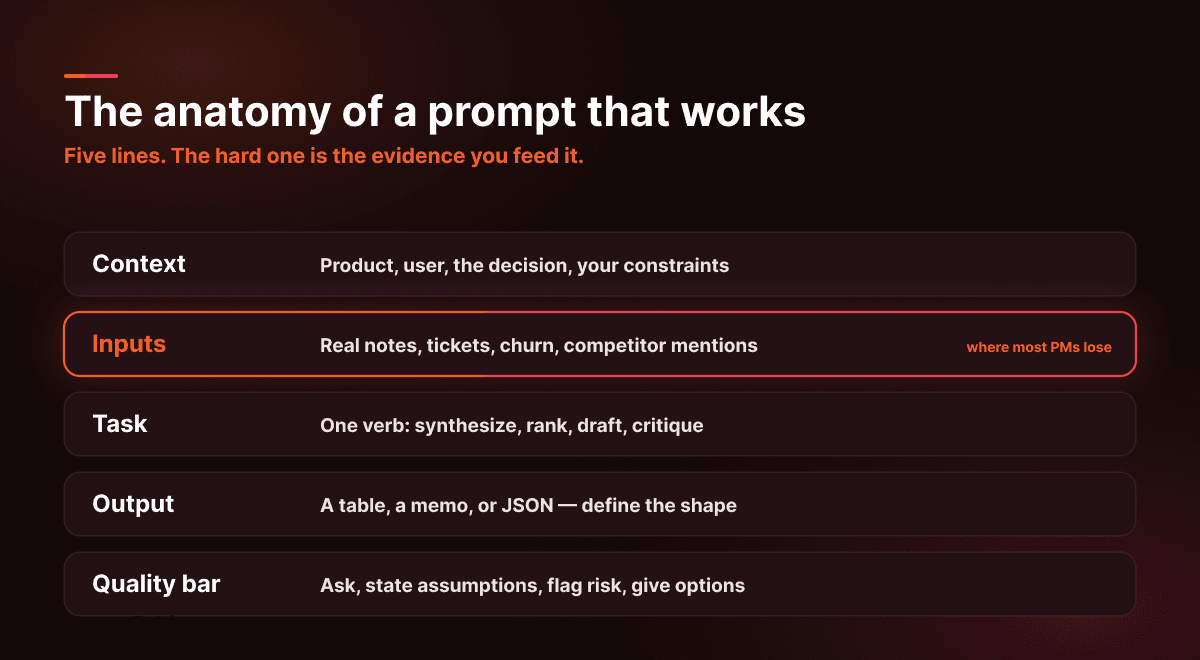
Fix that once with a reusable skeleton, then pour every prompt below into it:
Clarify the context by specifying the product, who it’s for, the decision you need, and your constraints (time, team, tech, compliance). For inputs, use real evidence: actual notes, tickets, call snippets, churn reasons, competitor mentions. Avoid broad statements like “imagine a SaaS company.”
Task — One clear verb: synthesize, rank, draft, critique, propose, compute.
Output — The shape you want back: a table with named columns, a one-page memo, JSON with defined keys.
Quality bar — Tell it to ask when something’s missing, state its assumptions, flag risks, and give you 2–3 options with a recommendation.
The “Inputs” line is where most PMs quietly lose. Everything else is typing. Gathering real evidence to paste in takes hours nobody budgets for. Hold that thought; we’ll come back to it.
Strategy and bets
Use these when direction needs to become decisions.
“Here’s our strategy: [paste]. List the five decisions we have to make this quarter. For each, give me why it matters, the evidence we’d need, and the cost of waiting.”
“Here are our active initiatives: [list]. Rank by expected impact vs execution risk, then name three to kill and defend each cut. Output a table.”
“Pull every assumption out of this plan: [paste]. For each, give me a cheap test and the result that would prove it wrong.”
“ICP: [ICP]. Category: [category]. Rewrite our positioning three ways — plain, bold, and skeptical-buyer-proof. No hype words.”
“Write a one-page narrative for [initiative]: the problem, the stakes, success metrics, the risks, and the single decision I’m asking for.”
“Here’s our pricing and packaging: [paste]. Flag the confusing parts and propose three alternative structures with tradeoffs.”
Discovery and research
Use these when you need synthesis, not more notes.
“Research goal: [goal]. Write me a 10-question interview guide with follow-ups and a note on which questions risk leading the witness.”
“Here are my interview notes: [paste]. Return a table of themes with representative quotes, how often each came up, and severity.”
“Turn this feature request into five Jobs-to-Be-Done statements, then pick the strongest and tell me why.”
“We have five days to answer: [question]. Propose the method, who to talk to, and what the output should be.”
“Here are my findings: [paste]. Give me three alternative explanations and how I’d rule each one out.”
“We’re about to ship [feature]. Run a pre-mortem: list the ways this fails and the earliest signal we’d see for each.”
Customer feedback and insights
Use these when feedback is loud, scattered, and contradictory.
“Cluster this feedback: [paste]. Return themes, a one-line summary each, a representative quote, and a tag.”
“Label each item as bug, usability issue, missing capability, pricing concern, or misunderstanding — and say why.”
“Split this feedback into emerging vs recurring, and tell me the rule you used to decide.”
“Map these feedback themes to churn risk, expansion, activation, or efficiency, with a confidence level on each.”
“From these support tickets: [paste]. Find the top five root causes and the fixes that would cut ticket volume most.”
“From these sales call notes: [paste]. Extract the objections, the outcomes the buyer actually wanted, and any deal-risk signals.”
“Turn these customer pains into eight homepage headlines a skeptical buyer would believe.”
Competitive intelligence
The category most prompt lists forget — and the one that quietly decides your roadmap. Use these when you need to know not just what customers want, but why you’re losing.
“Here are notes from our last 10 lost deals: [paste]. Which competitors show up most, what reasons recur, and what would have changed the outcome?”
“Competitor just shipped [feature]. Draft three possible responses — match, differentiate, or ignore — with the case for each.”
“Here are recent churn reasons: [paste]. Flag any that mention a competitor and group them by the switching trigger.”
“Competitors: [list]. Build a differentiation map on three axes and propose five claims we could defend in front of a skeptical buyer.”
“Cross-reference these feature requests [paste] against what competitors already offer. Which requests are table-stakes catch-up vs genuine differentiation?”
“Summarize this competitor’s latest launch [paste] in terms of the customer pain it targets and which of our accounts are most exposed.”
Roadmap and prioritization
Use these when everything feels urgent.
“Backlog: [list]. Constraints: [team, timeline, tech]. Propose a six-week plan and tell me explicitly what gets cut and why.”
“Score these initiatives with RICE. Ask me for any missing inputs first, then return a ranked table.”
“Rewrite this roadmap as outcomes with leading indicators, not features.”
“Add an evidence-quality tier to each roadmap item — strong, weak, or assumed — and define the tiers.”
“Map dependencies across these epics: [paste] and call out the critical-path risks.”
“Define the MVP for [feature]: must-haves, nice-to-haves, explicitly excluded, and the criteria to ship.”
PRDs, specs, and product writing
Use these when clarity matters more than speed.
“Draft a PRD for [feature]: problem, goals, non-goals, users, stories, requirements, edge cases, and metrics.”
“Convert this requirement into Gherkin acceptance criteria and flag anything ambiguous.”
“Here’s the happy path: [paste]. List edge cases across data, permissions, latency, and integrations.”
“Create a phased release plan with rollout gates, what we monitor, and rollback criteria.”
“Define the events and properties we need to measure [goal]. Output a tracking table.”
“Rewrite this UI text: [paste]. Give me five options and recommend one.”
“Write empty-state copy for [screen]: what it is, why it matters, and the next step.”
Stakeholder and executive communication
Use these when alignment matters more than explanation.
“Turn these bullets into a weekly update: [paste]. Sections for wins, progress, risks, and asks.”
“Build a 30-minute agenda to decide [decision], with a pre-read and the criteria we’ll judge against.”
“Compress this doc into one slide: a headline, three bullets, one metric, and the next step.”
“Draft a Slack message aligning engineering and GTM on [change]. Short, concrete, no ambiguity.”
“Here’s pushback I got: [paste]. Draft three firm-but-respectful responses.”
“Rewrite this status update as a leadership narrative. Keep every fact; lose the noise.”
Metrics, experiments, and analysis
Use these when the numbers exist, but the meaning doesn’t.
“Design an experiment for [hypothesis]: metric, sample size, duration, and the risks.”
“Here’s funnel data: [paste]. Diagnose the drop-offs and rank five fixes by likely impact.”
“From these churn notes: [paste]. Categorize the reasons, quantify each, and propose prevention steps.”
“Explain this cohort table: [paste]. What changed, why, and what should we test next?”
“Define [metric]: the formula, what’s included and excluded, and the ways people commonly misread it.”
“Design a dashboard for [persona]: six tiles, the purpose of each, and alert thresholds.”
The pattern hiding in all 50
Read back through the list and notice what the good prompts have in common. They don’t ask the AI to know things. They ask it to do something with material you provide: cluster this, rank that, diagnose these. The intelligence is in the inputs.
Which is exactly why most PMs get mediocre results. The prompt takes thirty seconds. Assembling the real inputs—the call notes in one tool, the tickets in another, the churn reasons in a spreadsheet, the competitor mentions buried in a lost-deal note—takes hours and usually happens late, from memory, or not at all. So the prompt runs on anecdotes and produces something that sounds right and isn’t.
Where HyperOrbit fits
This is the part we care about. Read it skeptically.
Prompts assume you already have clear, connected, current evidence to paste in. Almost nobody does. HyperOrbit is built to close that gap: a Voice of Customer agent that reads what customers say across tickets, calls, reviews, and churn notes continuously and ranks it by impact, and a Competitive Intelligence agent that watches the market — the two sharing signals, so when a competitor turns up inside a churn call, both see it.
The result is that the “Inputs” line of every prompt above stops being a scavenger hunt. You start with grounded, current evidence that already connects customer pain to competitive moves — rather than whatever you happened to remember this morning.
Two honest notes. We’re in private beta with design partners, so this is what we’re building toward, not a finished product you can switch on today. Querying that evidence directly or feeding it to your AI tools over MCP is on our roadmap, not shipped yet. What we’re sure of is the principle: use prompts to think and write faster, and stop letting “gathering the inputs” be the invisible tax on every decision, especially the inputs about your competitors, which most tools never gather at all.
FAQ
Do PMs really need prompts instead of just asking AI?
Vague questions get confident nonsense. Prompts force you to supply context, constraints, and a format, which is the whole reason they work. The structure is the point.
How many prompts should I actually use?
Most PMs reuse ten to fifteen. A big library helps discover patterns; your weekly work runs on a small core set you’ve refined.
Can prompts replace PRDs, roadmaps, or decisions?
No. They draft and structure thinking. Ownership, alignment, and accountability still belong to you, not the model.
Is it safe to paste customer data into these?
Only if your company policy allows it. Redact what you must and use approved tools. Convenience is not a compliance strategy.
When do prompts stop being enough?
When the inputs are scattered across many tools, the data needs to stay current, and decisions must tie back to accounts, revenue, and churn. At that point the bottleneck isn’t writing; it’s evidence.

Conclusion
The bottom line
Prompts make you faster at thinking. They do nothing about gathering, and gathering is where the hours and blind spots live. Get the inputs right, especially the competitive ones, and these fifty prompts turn from neat tricks into a genuine edge.
HyperOrbit is in private beta — a decision layer that assembles customer and competitive signals into evidence your team can actually act on. See what your stack is already telling you.